I've been always interested in small computers, so when I looked at this, I'm like: Way cool!
The GumStix is a way small, 20x80 mm, and can run Linux 2.6! comes with 64MB SDRAM too! What can you do with this small computer? Custom audio player? "Wifi-devicelet"?
Imagine ...
Sunday, September 24, 2006

Sunday, September 17, 2006
Laptop Hunt
I'm looking for serious laptop/notebook to use as my primary computing device for the next 5 years or so. I just found this page that seems very very informative. But I'd like your comments too.
Here's what I have in mind:
Here's what I have in mind:
- A dual-core 64-bit processor (preferably, the AMD X2 series). I'd definitely want one with the hardware virtualization features.
- About a GB of RAM
- 80--100 GB of HDD, though I must say, 60GB seems okay too.
- 15" screen, preferably SXGA+
- Wireless + Fixed-line networking
- Works with Linux.
NFS Locking
It doesn't work. Atleast not for me. Maybe it does in a properly configured environment. But this certainly isn't one.
Software that lock files can suffer badly when the files they lock are on NFS. And with most home directories being NFS mounted, this means that sooner or later you're going to encounter such software.
My first practical experience with NFS locking issues was during a ill-fated talk on Arch/TLA to a (thankfully) small group of friends. Arch/TLA doesn't work on NFS. All our demo machines had NFS-mounted directories. End of talk. Well, not exactly, since we did manage to salvage some part of it.
Then, of course, came the SQLite database problem. Or was it the PHP PECL compilation problem? Whatever. And lately, I discovered that Skype,stores its configuration files and uses locks to manage it's databases. On NFS, it just refuses to start, or takes ages to begin. I've experimented with moving the files to /tmp and creating a soft-link, which does work --- Skype starts up. But an unrelated(?) problem causes it to crash when I try to connect. Using Google to find out more leads to pages which complain of ABI differences between Skype's binary and the system glibc, and given that Skype is closed-source, can't do much about it. As an aside, I'm not using Skype, was just trying to debug the problem. For VoIP, I recommend GTalk or its free implementation at http://tapioca-voip.sourceforge.net. Note that I do not use VoIP.
So how do you assure conflict-free access to your files across all local disks as well as NFS? There should be a general solution, but my guess is, it varies from application to application. For a good example of how a lock-free mail spool was implemented, see the Maildir format invented by DJB.
Software that lock files can suffer badly when the files they lock are on NFS. And with most home directories being NFS mounted, this means that sooner or later you're going to encounter such software.
My first practical experience with NFS locking issues was during a ill-fated talk on Arch/TLA to a (thankfully) small group of friends. Arch/TLA doesn't work on NFS. All our demo machines had NFS-mounted directories. End of talk. Well, not exactly, since we did manage to salvage some part of it.
Then, of course, came the SQLite database problem. Or was it the PHP PECL compilation problem? Whatever. And lately, I discovered that Skype,stores its configuration files and uses locks to manage it's databases. On NFS, it just refuses to start, or takes ages to begin. I've experimented with moving the files to /tmp and creating a soft-link, which does work --- Skype starts up. But an unrelated(?) problem causes it to crash when I try to connect. Using Google to find out more leads to pages which complain of ABI differences between Skype's binary and the system glibc, and given that Skype is closed-source, can't do much about it. As an aside, I'm not using Skype, was just trying to debug the problem. For VoIP, I recommend GTalk or its free implementation at http://tapioca-voip.sourceforge.net. Note that I do not use VoIP.
So how do you assure conflict-free access to your files across all local disks as well as NFS? There should be a general solution, but my guess is, it varies from application to application. For a good example of how a lock-free mail spool was implemented, see the Maildir format invented by DJB.
Wednesday, September 13, 2006
New Software: Webfiler
After deciding not to use static HTML pages for my website, in order to make my website appear more "active", I looked around for some content management system for a single user. Mostly the list boils down to blogging software. Now I don't want to use MySQL or Postgresql (preferring SQLite), so the list shrinks even more. Unfortunately as this post showed, SQLite sputtered too. So now I was reduced to using flat-files. So scratch all software.
Now I'm not a programmer for anything! With strong NIH syndrome to boot. So I decided to write my own. I've been mulling over it for some days, and the idea was that the system would basically handle documents which have tagged. No folders, etc. Just tags.
I had just finished writing the tag database management library, when I realized IkiWiki probably did everything I wanted it to do (and better!). Not wanting to abandon whatever I had already done (after all I'd sacrificed lunch :) ), I continued, and Webfiler 0.1 was born.
It's now working nicely enough to be running my website. I'll put up the sources sometime.
Now I'm not a programmer for anything! With strong NIH syndrome to boot. So I decided to write my own. I've been mulling over it for some days, and the idea was that the system would basically handle documents which have tagged. No folders, etc. Just tags.
I had just finished writing the tag database management library, when I realized IkiWiki probably did everything I wanted it to do (and better!). Not wanting to abandon whatever I had already done (after all I'd sacrificed lunch :) ), I continued, and Webfiler 0.1 was born.
It's now working nicely enough to be running my website. I'll put up the sources sometime.
Monday, September 11, 2006
Free Advice
Learn a high-level, managed language. Any language that is not C. It could be Java, PHP, Python, or any of the .NET family. This is because C is not very suitable for prototypes, and you may end up fighting the language more than you end up writing your program. This is especially true if you're a neophyte at programming.
Sunday, September 10, 2006
SQLite databases on NFS mounts
I encountered this while installing Serendipity (a PHP based blogger) on PHP4 on a SuSE Linux system with apparently misconfigured NFS locking.
If your application accessing a SQLite database seems to hang forever, you might wish to check if said database is on NFS. SQlite uses locks, which don't seem to agree with some systems, causing it to think that the files are permanently locked. You can verify this by running sqlite dbname on the command line, you'll get the following output:
It will work fine if the database is relocated to local storage. Or as the commentary on this ticket entry shows, by running and installing nfs-utils. I think that it is installed, and running (lockd processes showing up), but I can't find the rpc.statd mentioned in the ticket entry. So am slightly puzzled, what is going wrong? And where is rpc.statd?
If your application accessing a SQLite database seems to hang forever, you might wish to check if said database is on NFS. SQlite uses locks, which don't seem to agree with some systems, causing it to think that the files are permanently locked. You can verify this by running sqlite dbname on the command line, you'll get the following output:
SQLite version 2.8.16
Enter ".help" for instructions
sqlite> .tables
Error: database is locked
sqlite>
It will work fine if the database is relocated to local storage. Or as the commentary on this ticket entry shows, by running and installing nfs-utils. I think that it is installed, and running (lockd processes showing up), but I can't find the rpc.statd mentioned in the ticket entry. So am slightly puzzled, what is going wrong? And where is rpc.statd?
Thursday, September 07, 2006
My First "Publication"
Was writing the publications section for my student website, and remembered this:
Article #1 (?)
Yes, yes, I know. Those were very different times. And a very different me.
And my publication section still contains "None". Sigh.
Article #1 (?)
Yes, yes, I know. Those were very different times. And a very different me.
And my publication section still contains "None". Sigh.
Friday, August 25, 2006
Gotcha!
It isn't everyday that your code exposes a bug in a C compiler, that too, one which has been around for 7.4 versions. I've been writing code that tests a computer's floating point routines for compliance with IEEE 754 with respect to NaNs, denormals and the REM operation. gcc-2.95 has been my friend on all the various archs that I've tested, except on the SGI workstations, where I'm using the vendor supplied MIPSPro v7.4 compiler.
Now consider:
number != number
What will this condition evaluate to? False always? Right? Hence the compiler simply replaces the above with False (or zero) at compile time.
Except, it gets it wrong when it does the same to float variables. You see, if the float contains a NaN, then the above test is true! NaNs do not compare equal.
Aha! Now where do I report this bug?
Some other "crazy" stuff (called constant foldings, or compile-time evaluations done by GCC):
n * 1.0 => removed, as n is not changed
n / 1.0, likewise
n * 2.0 => n + n
And all of this with optimizations disabled! Wow!
Now consider:
number != number
What will this condition evaluate to? False always? Right? Hence the compiler simply replaces the above with False (or zero) at compile time.
Except, it gets it wrong when it does the same to float variables. You see, if the float contains a NaN, then the above test is true! NaNs do not compare equal.
Aha! Now where do I report this bug?
Some other "crazy" stuff (called constant foldings, or compile-time evaluations done by GCC):
n * 1.0 => removed, as n is not changed
n / 1.0, likewise
n * 2.0 => n + n
And all of this with optimizations disabled! Wow!
Thursday, August 24, 2006
It's Raining Unices!
In pursuit of the execution of an assignment, I met and was introduced to:
Solaris (UltraSPARC) [actually, have met this during undergrad]
HP-UX (PA-RISC)
Tru64 (Alpha)
AIX (PowerPC)
Irix (MIPS-based SGI)
All of them are old. Lack decent shells (GNU bash), some lack decent editors (Emacs), all lack good GUIs, good browsers (Netscape 4 is everywhere!), decent compilers (GCC where present is 2.95 and ye gods, even 2.8!) etc.
Fun. Me thinks.
Solaris (UltraSPARC) [actually, have met this during undergrad]
HP-UX (PA-RISC)
Tru64 (Alpha)
AIX (PowerPC)
Irix (MIPS-based SGI)
All of them are old. Lack decent shells (GNU bash), some lack decent editors (Emacs), all lack good GUIs, good browsers (Netscape 4 is everywhere!), decent compilers (GCC where present is 2.95 and ye gods, even 2.8!) etc.
Fun. Me thinks.
Friday, August 18, 2006
Farewell!
So it was finally laid to rest. The 7-year old 14" monitor, the last-but-one-remnant of my first computer, is no more. May it rest in peace.
The Samsung 4Bni was a nice monitor to work with, if a bit troublesome. Within two years, it had two "crashes", which caused it to hiss in a wierd manner. Those were fixed, albeit leaving movies a bit darker, and the next 5 years were peaceful. Last December, a curious high-pitched whistle started emanating at 1024x768, dying down only when I switched to 800x600. Within a few weeks, the hisses were back.
I was reluctant to repair it, given that it had served so long, and so set out to buy a new one. Shortage of funds meant that I would have to continue working with it. Thankfully (?), RSI made me largely stop using the computer, which rendered the question of when to buy it redundant.
When I did get back to it, it seemed better, but would not start up. Eventually, I would boot blind, and it was only in the 800x600 mode that it would come on. By July-end, it had stopped doing that too. Given that I would be moving soon at that time, and then could work headlessly, the computer was operated without the monitor.
But given I'm not the only user of the computer, pressure kept mounting, until it finally resulted in this 17" Samsung 793S:
 Given my experience with the 793DF (that I'm typing on, and which differs only in the dot pitch with the 793S), it looks to be a good monitor. Here's wishing it a long life.
BTW, the Linux Addict is not me.
The Samsung 4Bni was a nice monitor to work with, if a bit troublesome. Within two years, it had two "crashes", which caused it to hiss in a wierd manner. Those were fixed, albeit leaving movies a bit darker, and the next 5 years were peaceful. Last December, a curious high-pitched whistle started emanating at 1024x768, dying down only when I switched to 800x600. Within a few weeks, the hisses were back.
I was reluctant to repair it, given that it had served so long, and so set out to buy a new one. Shortage of funds meant that I would have to continue working with it. Thankfully (?), RSI made me largely stop using the computer, which rendered the question of when to buy it redundant.
When I did get back to it, it seemed better, but would not start up. Eventually, I would boot blind, and it was only in the 800x600 mode that it would come on. By July-end, it had stopped doing that too. Given that I would be moving soon at that time, and then could work headlessly, the computer was operated without the monitor.
But given I'm not the only user of the computer, pressure kept mounting, until it finally resulted in this 17" Samsung 793S:
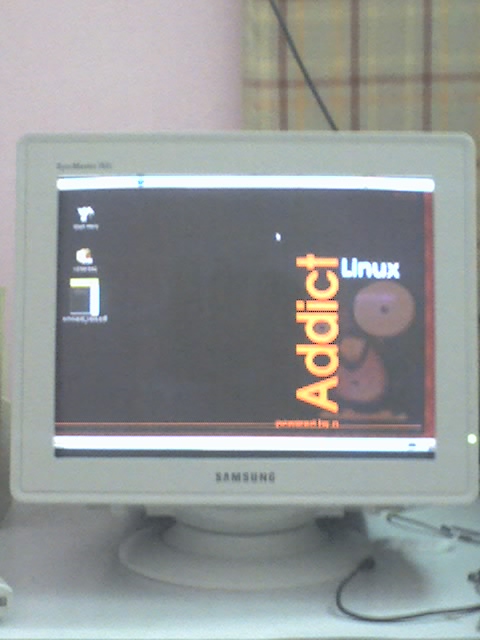 Given my experience with the 793DF (that I'm typing on, and which differs only in the dot pitch with the 793S), it looks to be a good monitor. Here's wishing it a long life.
BTW, the Linux Addict is not me.
Sunday, July 16, 2006
End of an Era
Today I disconnected the D-Link DFM-560E external analog modem that had been my only link to the online world for over 7 years. With my month-old ADSL connection never failing, and in fact, working even when the dial-up would have failed, during the recent phone outage, the modem was never needed. Rather than sit around gathering dust, I decided to pack it up in its box, so that I can return it to the person it actually belongs to!
Yes, the modem isn't mine! I borrowed it from a friend the day it arrived in May 1999, and it's been with me ever since. That friend moved onto an internal modem years later, and then to "broadband" always-on internet, and is now moving to DSL as I write. This modem will, therefore, be as much of use to him as to me now.
Before it arrived and took up its place on top of my chassis, I used to connect using a 14000bps modem, whose history, I must say I've misplaced in my memory. Clearly, this modem featuring 56K connectivity, supporting both the K56Flex and V.90 standards, was a huge improvement. It also meant that I could now consider downloading huge files, and eventually did end up doing so. The 6 CDs with a huge assortment of (for Windows, and therefore now useless to me) software are a testament to that. The biggest download? The newly released DirectX 7 SDK (with support for VB!) that at 128M (or so) took over a month for me to download! Nine cryptically labelled red leds: PWR, MR, DTR, HS, AA, OH, CD, TD, and RD kept me company on those nights and early morning jaunts into cyberspace for that next download, that next shot of information.
VSNL, now Tata Indicom, was the only ISP in those times, until the ISP sector was finally opened up. I remember using Sify too at one time. Then MTNL crashed the party with its post-paid dial-up Internet scheme. I've used only dial-up, refusing to replace the brown box on top of my cabinet with a unknown and unreliable cable modem service. It's been a long time.
Now green leds stare and blink at me from my D-Link DSL-502T router. And the download meter shows 25.6 KiB/s.
Yes, the modem isn't mine! I borrowed it from a friend the day it arrived in May 1999, and it's been with me ever since. That friend moved onto an internal modem years later, and then to "broadband" always-on internet, and is now moving to DSL as I write. This modem will, therefore, be as much of use to him as to me now.
Before it arrived and took up its place on top of my chassis, I used to connect using a 14000bps modem, whose history, I must say I've misplaced in my memory. Clearly, this modem featuring 56K connectivity, supporting both the K56Flex and V.90 standards, was a huge improvement. It also meant that I could now consider downloading huge files, and eventually did end up doing so. The 6 CDs with a huge assortment of (for Windows, and therefore now useless to me) software are a testament to that. The biggest download? The newly released DirectX 7 SDK (with support for VB!) that at 128M (or so) took over a month for me to download! Nine cryptically labelled red leds: PWR, MR, DTR, HS, AA, OH, CD, TD, and RD kept me company on those nights and early morning jaunts into cyberspace for that next download, that next shot of information.
VSNL, now Tata Indicom, was the only ISP in those times, until the ISP sector was finally opened up. I remember using Sify too at one time. Then MTNL crashed the party with its post-paid dial-up Internet scheme. I've used only dial-up, refusing to replace the brown box on top of my cabinet with a unknown and unreliable cable modem service. It's been a long time.
Now green leds stare and blink at me from my D-Link DSL-502T router. And the download meter shows 25.6 KiB/s.
Friday, June 30, 2006
Blogging Tools
I'm using Drivel 2.0.2 for posting my blogs using the Blogger Atom API. I've also tried BloGTK and the really nice Blog Entry Poster, but Drivel is what I finally ended up using. Here's why:
* Drivel doesn't store my password
* It supports the Blogger Atom API, which means I get proper titles on my Blogger blog
* Has almost everything I need (drafts, etc.)
I also did try the Emacs plug-in, but dial-up + CURL seemed not to like it. Pity.
Drivel's not perfect however, in particular, I seriously miss toggling comments per post, but it's the Blogger Atom API at fault over here. Hope they get the Atom Publishing protocol finalized soon. The Atom Syndication format is really nice, and I'm really hoping for a good API.
For reading blogposts, I prefer to use Liferea. So please enable RSS feeds on your site. Yes, UT, this means you.
* Drivel doesn't store my password
* It supports the Blogger Atom API, which means I get proper titles on my Blogger blog
* Has almost everything I need (drafts, etc.)
I also did try the Emacs plug-in, but dial-up + CURL seemed not to like it. Pity.
Drivel's not perfect however, in particular, I seriously miss toggling comments per post, but it's the Blogger Atom API at fault over here. Hope they get the Atom Publishing protocol finalized soon. The Atom Syndication format is really nice, and I'm really hoping for a good API.
For reading blogposts, I prefer to use Liferea. So please enable RSS feeds on your site. Yes, UT, this means you.
DSL Line Installation experiences
My MTNL Triband DSL line was "installed" on June 19, and here's how it came to be.
First of all, while the 1500 call center is extremely quick in issuing your work order (next day), it took upto June 22 for someone to call me up and ask if I had asked for a Triband connection. On replying that my broadband connection was well and fine, he disconnected and then called back to ask if I indeed had Triband or some other connection! Talk about organizational ignorance.
Anyway, I had to go buy my own DSL "router", a D-Link 502-T, as they finally told me that modems were out of stock. Once that was done, my connection was up in 3 days. Here's the complete chronology:
May 29: Apply to 1500.
May 30: Work order issued.
June 6: Account created on MTNL's servers. 150 MB used up for testing (?)
June 12: I get back from Bangalore, and am concerned nobody's called back.
June 13,14,15: Run around on the telephone calling up everybody, and all they do is redirect me to other numbers. But they do this very helpfully :-).
June 16: Finally reach somebody who's supposed to come and deliver the modem, but that person tells me modems are out of stock, and will take another 3--4 weeks. Yikes! Go and buy modem the same day, sets me back plenty, but heck, I'm not penny wise and pound foolish. Spend hours trying to configure the modem (as they've told me that my connection is already enabled). After a midnight call to 1504, I'm told maybe the exchange hasn't enabled DSL on my line yet. Thankfully, Saturday's a working day.
June 17: Call up, and am told that work is done. But since the ADSL light on my modem is not lighting up ("DSL Carrier Down" in the logs), a double check reveals that indeed some work is remaining at their end. Not my fault then. Tell me that it will be done by end of day.
June 18: DSL is not yet up, and my phone line goes dead. My mood gets mean.
June 19: Afternoon, phone line comes back up, and hurray, ADSL light starts blinking, indicating modem is "training". However, it never turns solid (indicating connection), and I make a call to the exchange. In between the call, it connects! I quickly check out if the Net works, and it does! It's very very slow however. But I think that's a problem at my end. I do the "reset" test --- switching the modem off and trying again. Unfortunately just blinking, but no connection. Make a call again, and same results -- it's connected! Turns out that I need to pick up my phone (on a parallel line) for a few seconds to connect. And I thought I had left dial-up behind!
June 22: Some guy calls asking if I had asked for Triband, is rather surprised that it's already installed, and thankfully cancels the monthly rental.
June 30: 1500 calls back and asks if everything is done. Surprised that I bought my own modem, but said they'll not charge me the security deposit. That about wraps it up I think.
Well, the slowness I experienced was a result of a problem with the DNS forwarder on the router (host(1) complains about invalid replies), which I bypassed by connecting directly to MTNL's DNS servers. And not line length (nearly 20 feet from the wall jack), or noise as I initially thought. Indeed, it's a sweet line, with very consistent speeds. Only two disconnects so far on my watch. There does seem to be a problem with low-bandwidth apps like IM clients (which mysteriously lose connections and conversations), but maybe that's some other problem.
Now I wait for the day Indian ISPs will grow up and offer more than 256kbps without metering downloads, like say 6Mbps!
First of all, while the 1500 call center is extremely quick in issuing your work order (next day), it took upto June 22 for someone to call me up and ask if I had asked for a Triband connection. On replying that my broadband connection was well and fine, he disconnected and then called back to ask if I indeed had Triband or some other connection! Talk about organizational ignorance.
Anyway, I had to go buy my own DSL "router", a D-Link 502-T, as they finally told me that modems were out of stock. Once that was done, my connection was up in 3 days. Here's the complete chronology:
May 29: Apply to 1500.
May 30: Work order issued.
June 6: Account created on MTNL's servers. 150 MB used up for testing (?)
June 12: I get back from Bangalore, and am concerned nobody's called back.
June 13,14,15: Run around on the telephone calling up everybody, and all they do is redirect me to other numbers. But they do this very helpfully :-).
June 16: Finally reach somebody who's supposed to come and deliver the modem, but that person tells me modems are out of stock, and will take another 3--4 weeks. Yikes! Go and buy modem the same day, sets me back plenty, but heck, I'm not penny wise and pound foolish. Spend hours trying to configure the modem (as they've told me that my connection is already enabled). After a midnight call to 1504, I'm told maybe the exchange hasn't enabled DSL on my line yet. Thankfully, Saturday's a working day.
June 17: Call up, and am told that work is done. But since the ADSL light on my modem is not lighting up ("DSL Carrier Down" in the logs), a double check reveals that indeed some work is remaining at their end. Not my fault then. Tell me that it will be done by end of day.
June 18: DSL is not yet up, and my phone line goes dead. My mood gets mean.
June 19: Afternoon, phone line comes back up, and hurray, ADSL light starts blinking, indicating modem is "training". However, it never turns solid (indicating connection), and I make a call to the exchange. In between the call, it connects! I quickly check out if the Net works, and it does! It's very very slow however. But I think that's a problem at my end. I do the "reset" test --- switching the modem off and trying again. Unfortunately just blinking, but no connection. Make a call again, and same results -- it's connected! Turns out that I need to pick up my phone (on a parallel line) for a few seconds to connect. And I thought I had left dial-up behind!
June 22: Some guy calls asking if I had asked for Triband, is rather surprised that it's already installed, and thankfully cancels the monthly rental.
June 30: 1500 calls back and asks if everything is done. Surprised that I bought my own modem, but said they'll not charge me the security deposit. That about wraps it up I think.
Well, the slowness I experienced was a result of a problem with the DNS forwarder on the router (host(1) complains about invalid replies), which I bypassed by connecting directly to MTNL's DNS servers. And not line length (nearly 20 feet from the wall jack), or noise as I initially thought. Indeed, it's a sweet line, with very consistent speeds. Only two disconnects so far on my watch. There does seem to be a problem with low-bandwidth apps like IM clients (which mysteriously lose connections and conversations), but maybe that's some other problem.
Now I wait for the day Indian ISPs will grow up and offer more than 256kbps without metering downloads, like say 6Mbps!
Monday, June 19, 2006
Motorola RAZR V3i + Gtkpod
If you want to use the Motorola iTunes enabled phones, make sure:
1) You run the packaged Windows iTunes on the phone atleast once before running gtkpod.
This seems to setup the correct directory structure, and (more importantly) the correct encoding inside the iTunesDB file.
2) You're running a CVS version of GtkPod (0.99.6CVS works for me).
Then, you don't need the Windows iTunes anymore.
Enjoy!
1) You run the packaged Windows iTunes on the phone atleast once before running gtkpod.
This seems to setup the correct directory structure, and (more importantly) the correct encoding inside the iTunesDB file.
2) You're running a CVS version of GtkPod (0.99.6CVS works for me).
Then, you don't need the Windows iTunes anymore.
Enjoy!
Subscribe to:
Posts (Atom)
